- Good and could be excellent - Chad, 12 December 2024
Good monitor for price point. Has all features you need and desire for gaming with a high resolutions.
Bad side the monitor is dim and the HDR is extremely poor. Either than that the rest is gucci.
- Bang For Buck Monitor - Craig, 7 June 2024
For what you pay, you get an amazing monitor that does not break the bank.
Quality and imaging is incredible.
I upgraded from 1080p, 144hz to 1440p, 180hz and its an instant improvement.
A bit of calibration is needed, but that is expected with all new monitors and to each their own.
The one down side, the standard VESA mounts are 100x100 with 75x75 as an inner option of the bracket.
This monitor only allows for 75v75, so your 100x100 mounts will only work with larger screws and will sit on the back of the monitor on the RGB Ring light, pressing against it and not in the dedicated 75v75 slot.
The monitor is very wobbly with the stand that comes with, so this is something that could be worked on in the future but can be ignored.
Overall, very happy with this monitor.
- Good - Carel, 3 June 2024
Just a very good screen.
- Good Monitor at a good price - Anton, 29 May 2024
I had a 144hz tn 1080 panel and was looking at the oled monitors, but couldn't bite the bullet and shell out that kind of money so I thought I would go for a normal 1440p monitor. This monitor was a massive upgrade and I would highly recommend it. There is no noticeable blurring or other major downsides, so far at least...
- Value for money - Cameron, 24 May 2024
Monitor is good value for the money. Has a thick anti-glare coating, which makes text a bit fuzzy on websites, but not so noticible in games. 75mm VESA works, but has to press against the lighting ring in the back, instead of fitting inside the mounting gap like other manafacturers. OSD is very basic and barebone, but does the job. Colours out the box need some calibration, but once it's done it looks good. All in all happy with the monitor for the price you pay.
- Awesome - Hugo, 23 May 2024
For the price and what you get this monitor is amazing.
definitely worth it.
- High End Budget Bargain - Satisfied Customer, 22 May 2024
Introduction & Unboxing
The packaging is subtle and mostly generic so nothing to really speak about here other then it does the job of keeping your new Wootvision monitor safe during delivery or collection.
I would have preferred black packaging much like when one purchased alcohol on Sundays in South Africa years ago or anything from an adult store... as you note most things designed for a good time come in black packaging so that's a point deducted from Wootware and 5 points to Slytherin.
What's in the box What's in the box What's in the box
- 1 x 27" IPS Monitor Panel
- 1 x Adjustable Monitor Stand
- 1 x DisplayPort 1.4 Cable (1.5m in length)
- 1 x HDMI 2.0 Cable (1.5m in length)
- 1 x Power Adapter Plug (1.5m in length, DC 12V 4A)
- 1 x Instruction Manual (Monitor code CG27DQI-180Hz on the manual almost as if Wootware didn't hand produce this monitor I'm shocked)
First impressions (much like when a parent sees you french kissing their daughter for the first time) are that it feels somewhat cheaply made comes to mind but no cheaper then many other budget name brand screens for the most part. It's mostly subtle in aspects of a gamer screen which is always welcomed as this would fit in fine for office work (and your sex dungeon). There are some slight imperfections with the build but nearly not noticeable unless you fine comb every inch of it.
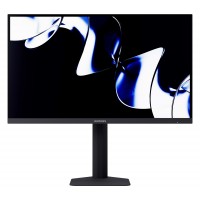
The physical frame of the screen measures around 0.2cm at the sides and at the top whilst this measures in at 1.8cms to the bottom (These measurements may somewhat arouse a few of our members members, honourable member). The actual screen bezels are roughly 0.6cm situated along the sides and top of screen whilst the bottom bezel measures in at around 0.2cm. External dimensions of the screen from outside measurements of the frame are 61.4cm left to right and 36.3cm top to bottom. The base measurements are roughly 20.3cm depth and roughly 21.3cm at the widest point of width. The maximum adjusted height of the monitor in it's lowest position is 40cm tall and at it's maximum height adjustment is 50.8cm tall (So Oj0 has some competition).
Monitor assembly tips for noobs (Instruction manuals are for console owners) so be prepared with lots of duct tape and lube *wait what*..... butt seriously..... listen carefully, listen carefully.... but seriously it's simple the monitor stand of this unit screws together with one attached screw on the base of the stand and the stand neck lined up using three built in prongs for guidance inserted into the base (Kinky I know, be gentle it's my first time). The neck then clips into the back of the monitor panel (ensure this is secure before allowing it to rest by itself even if it means you need somebody to assist otherwise it's an expensive paperweight), after this it just requires the power plugged in at the bottom of the panel and whichever display suits your preference.
Monitor stand is wobbly, base sits firmly down however the screen can be wobbled if you physically move or touch the screen. This is an adjustable stand so don't cry about it wobbling a little and just be happy they gave you this decent stand at this pricing.
(Boring section)
After assembly you will note the monitor controls are the typical budget friendly kind at the bottom right of the panel frame.
Button Operation is as follows (Buttons from left to right)
- M stands for Menu and is pressed to open the Main OSD Menu or to select Sub Menus
- Down arrow (Used for what you would expect in menu selections)
- Up arrow (Used for what you would expect in menu selections)
- E stands for Exit OSD but is also used to select your source input (Typically inputs are picked up automatically like most dates in certain areas of Kempton Park or Pretoria)
- Power is all the way to the right of the buttons, it has a blue LED (If you struggle to turn things on you could just buy her/him dinner and a movie first)
When powering on you are greeted with a Wootware logo (NOICE).
(Boring section) Skip this part if you value your time on earth as it's mostly what you know, only peruse here if you are unsure of a setting or looking for something specific on how it is set.
The OSD Menu Setting Selections with descriptions
Input Source
- To select DP1/DP2 or HDMI1/HDMI2 otherwise it auto selects your source
Brightness/Contrast
- Brightness Level 0 to 100
- Contrast Level 0 to 100
- DCR(Dynamic Contrast Ratio) ON/OFF
Color Setting
- Gamma values 2.0/2.2/2.4
- Picture Mode Standard/Game/FPS/Movie/RTS
- Colour Temperature Normal/Warm/Cool/User
- Hue Level 0 to 100
- Saturation Level 0 to 100
- Low Blue Light Level 0 to 100
Picture Quality Settings
- Sharpness Level 0 to 100
- Response Time Off/High/Middle/Low (Low being the fastest)
- Noise Reduction Off/High/Middle/Low
- Super Resolution Off/High/Middle/Low
- Dynamic Luminance Control ON/OFF
Display
- Aspect Ratio Wide Screen/Auto/4:3/1:1
Audio
- Mute ON/OFF
- Volume Leve 0 to 100 (External Output)
OSD
- Language to select your preferred OSD Menu language (Out of interests sake there are 11 languages with English as the first)
- OSD H-Position to change horizontal position of the OSD Menu
- OSD V-Position to change vertical position of the OSD Menu
- OSD Transparency to change how see through your OSD Menu is Level 0 to 100
- OSD Timer Out to set how long until your OSD Menu exits the screen automatically
- OSD Rotation to rotate your on screen OSD Menu
Other
- FreeSync (Adaptive Sync) ON/OFF
- HDR to turn HDR ON/OFF (Requires the HDMI cable to be used but makes little to no difference as it's only HDR400)
- MPRT(Motion Picture Response Time) to set this ON/OFF (This needs to be on if you wish to hit their quoted 1ms response time)
- Flicker Free to set this to ON/OFF (Reduces the perception of flicker makes little to no difference as the screen has minimal flicker to start with comes set ON)
- LightEffect to set this ON/OFF (This is the RGB ring at the rear of the monitor and these are the only options it has)
- Reset (This restores all original settings)
Now that the mumbo jumbo is out the way
Display Performance
This screen boasts a maximum refresh rate of 180Hz (Please note only available when using included displayport cable, if you use the included HDMI cable you will only achieve 144hz) and a maximum resolution of 1440p.
This monitors color gamut covers 90% of the DCI-P3, 100% SRGB colour space. It also offers a colour depth of 1.07 billion colours (8-bit + FRC). The monitor also features a high contrast ratio of 1000:1 resulting in excellent colours for a budget monitor.
Viewing angles are adequate 178 degrees for an IPS.
HDR support is offered in the form of HDR400 certification (However this is really pointless if you wish to experience HDR in all it's glory you should be buying an HDR1000 screen at least but you're reading this as you're looking at this juicy budget option monitor with bank cards ready and waiting).
MPRT is also featured to reduce motion blur and this setting is essential when you wish to achieve their advertised 1ms response time (Yes this does take the brightness down extremely, if it was a bright student and went to South African public school that's about just how extreme the brightness drops).
Freesync (Adaptive Sync) works pretty well in all titles tested (Cyberpunk 2077, MW2/MW3, CS2, GTA 5, RDR2, Fallout 4/76, Forza Motorsport 8, Borderlands, Portal amongst many other titles used) minimizing any visible screen tearing but it cannot be used in conjunction with MPRT (When using maximum Hz of the monitor and high frame rates tearing was nearly unnoticeable so you do not need adaptive sync if your system is strong enough to unleash this screen along with the dogs of war). Please note Nvidia says it is not on the G Sync compatible list however G Sync Compatibility appears to work fine.
Gaming test experience
In the budget realm of gaming monitors available this particular unit tends to lean more towards competitive FPS titles due to it's high refresh rate and more then adequate response times motion blur is kept to an absolute minimum, it is recommended to have response time set to low and MPRT turned on for competitive fast paced stuff and it was a very respectable performance when I put it through the paces of some of these games definitely the better budget option over any of the VA offerings for competitive as usual with it being a decent quality IPS panel. The 27 inch size is also perfect to maintain focus in such titles.
As for RPGs it is wonderful experience still (preferrably with MPRT turned off not to affect your enjoyment of the colourful worlds) and at 27 inches it's still a decent amount of real estate to play on. In games like GTA 5 or Red Dead Redemption 2 the world is represented with crispness and wonderful bright colours(MPRT off).180Hz for many is a more realistic number to achieve with the way titles are so unoptimized with us at the hands of lazy AAA developers.
So what did we learn class from MPRT on this specific monitor ON = all competitive fast paced games and OFF = all non competitive beautiful looking games.
Media content experience
It's a rich screen with great colours and coverage wise, do not let the specs put you off as for the price you will be able to enjoy Amazon Prime, Netflix or Youtube if not your own Blu ray collections in the absolute bliss in the budget range. This monitor blows away many in it's price range and trades blows with the typical IPS ones in higher price brackets all be it the specs are lower on many parts in this one, you do end up getting what you paid and with this you're getting way more then you budgeted for experience wise which again is a win. You just feel right at place watching Movies, Music Videos, Reviews or any form of Media (Maybe only one wish that there might be a screen a little larger then this in the future because it's so nice that you want more of it).
Professional work/Office
For normal office or email tasks the screen is definitely sharp, bright and clear enough to overcome any boring task so that's a tick for Office work. For people needing perfect colour correctness I'd recommend looking elsewhere but this is adequate all depending on how far you would be willing to go spend wise for a studio type monitor. This is still in essence a budget gaming monitor not intended to be used by professionals however it's more then perfectly fine for casual content creators or anyone for that matter with a strict budget.
Typical Monitor Tests
UFO Test(180Hz at 180fps) - Slight trails were observed on the aliens eyes, outlines as well as the white dots on the spaceship which is still excellent for the price
Test Pattern - Overall the screen was perfectly detailed, sharp and clear (Test feels how it did waiting for the SABC to start)
Defective Pixels - None were observed (How disappointing the screen isn't broken)
Uniformity - Perfectly acceptable uniformity was observed
Colour Distances - On par with most other IPS panels (When doing some of these tests ask yourself what you are doing with your life and please oh please make it stop)
Sharpness - Very good sharpness was observed
Viewing Angles - Excellent as expected only slight colour or image distortion when viewed at extreme angles (Who the hell looks at their monitor anywhere but their desk you animals)
Design
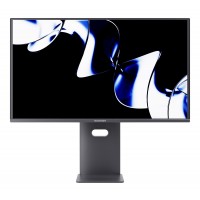
The monitor is equipped with a fully adjustable stand that allows for tilt, swivel, pivot, and height adjustments (wobbly but it's a win having adjustment options hells yeah). It also has the option of being mounted via VESA 75 x 75. The panel is flat with a non glare treated surface. The all black finish maybe cheap but oozes class versus over the top gamer styled monitors. The back of the panel frame is littered with shapes and lines to give it a more premium feel then it's allowed to have and the light effect ring as they call it adds a little something for those who love lights however as mentioned this is not controllable besides having the ability to be on or off (Much like some of my exs). There are 2 x DisplayPort 1.4 and 2 x HDMI 2.0 so numerous connection options for a budget with no usb points. Cable management is nearly non existent with just one hoop on the stands neck situated at the back of the neck near the bottom. Let's just say this is less of a SHOW and more of a GO monitor, the performance bites harder then the finish.
Value
Budget buyers beware you get what you pay for so if you were thinking you've just ordered a Big Mac with some cheese.... this would be like ordering that and they messed up your order by replacing the wussy processed beef patty with a gourmet steak and just about all the delicious toppings you could think of for the price of a Big Mac. So big up to Wootware for making it possible to purchase a wonderfully well rounded monitor usage wise available to the South African consumers. It's not often you get a product that the public want for a price that the public love with the ability to impress them.... Xceed comes to mind as trying to do this however where they fell short this offers more to the point where you spend the money and don't have to give it a second thought (There's no feeling of money wasted).
Pros
Great price
Excellent resolution and refresh rate
Outstanding panel (For the pricing)
Adjustable stand
Decent response time (For the pricing)
VESA 75 x 75
FreeSync (Adaptive Sync)
Cons
MPRT has to be used to reach near their quoted response time (MPRT does not stay on when this monitor is restarted)
HDR is just there for advertising a feature
Quality feels cheap could be a little better (but for the price stop crying you spoilt brats)
Another con is it's so difficult to find cons on this thing for the price pfft
Conclusion
There is next to nothing at this price point for what is on offer
- IPS Panel
- 180Hz
- 1440p
- Adjustable stand
So much bargain for so little pricing, less is not more, more is more
When is yours arriving?
- Very good value for money - Jason, 20 May 2024
This monitor is great! I had it for about a week now. I trusted Wootware’s own brand would deliver a good product, and they didn’t disappoint. Especially considering the price compared to other brands with the same specs. Coming from a VA 1080p 144Hz monitor to this one is a game-changer; games are super smooth and responsive, and the colour and refresh rate are amazing as well as the HDR. I would highly recommend this – there are no downsides I have experienced or can think of.
- Good value for what you pay! - Franco, 19 May 2024
As a start of their own product line, good job Wootware! Very satisfied with my monitor. If only the HDR component had higher nits, it would have been almost perfect. It’s current HDR brightness and contrast is still ok, though.

 In stock with Wootware